Posts

Showing posts with the label Tips and Tricks

How to Enable Multiple Concurrent User in Remote Desktop Windows 7

Links: 1.  http://forum.sambapos.com/t/step-by-step-on-how-to-configure-multiple-concurrent-rdp-clients-to-run-sambapos-iphone-ipad-galaxy-tablet/769 2.  http://www.nextofwindows.com/how-to-enable-multiple-concurrent-user-in-remote-desktop-windows-7/

Add Copy To or Move TO on Windows 7 Right Click Menu

Image
Add Copy To or Move To On Windows 7 Right Click Menu – In this post we will see the steps on how to add copy to or move to on windows 7 right click menu. While there are lot of registry hacks available for Windows, one of them allows you to add a   Copy To   or   Move To   on Windows 7 right click menu. This option can be very useful when you want to move or copy a file but don’t have the other folder open already. Before you make any changes to the registry it is recommended to take a backup of registry. We will now see the steps to add copy to or move to on windows 7 right click menu manually. Add Copy To Folder To open the   Registry Editor   on your Windows 7 computer, hold the Windows Key + press R to open the run, type   regedit to open the   Registry Editor . In the Registry Editor navigate to the following key: HKEY_CLASSES_ROOT\AllFilesystemObjects\shellex\ContextMenuHandlers.  Right click the   ContextMenuHandlers ...

How to unhide virus from pen drive which are hidden even after enabling show hidden folders.

If your Pen Drive is infected with any of the following viruses: * Autorun.inf * new folder.exe * Iexplorer.vbs * Bha.vbs * nfo.exe * New_Folder.exe * ravmon.exe * RVHost.exe or any other files with extension. Actually this viruses are hidden and can't be seen even after you enable show hidden folders. Following simple dos command will change the attributes of these files ,there after you can remove it by pressing delete key. Follow these steps: Step1.:Type cmd in Run Step2.: Switch to the drive on which pen drive is connected (like C:\> h: enter) Step3.: type exactly as attrib -s -h *.* /s /d and hit enter (don't forget spaces). Now you can see hidden virus files and you can delete them

How to Disable User Name and Initials on First Run of Office 2007

We can disable "user name and initials" pop up prompt for the first time using below script codes. Save this script in ".cmd" format and run it , should not  prompt anymore. If you want to disable for all users , try to save in user log on settings. Reg Add HKCU\Software\Microsoft\Office\12.0\Common\General /v ShownOptIn /t REG_DWORD /d 1 Reg Add HKCU\Software\Microsoft\Office\Common\UserInfo /v Company Reg Add HKCU\Software\Microsoft\Office\Common\UserInfo /v UserName /d "%UserName%" Reg Add HKCU\Software\Microsoft\Office\Common\UserInfo /v UserInitials /d %UserName:`0,1% References:  1. http://www.experts-exchange.com/Software/System_Utilities/Remote_Access/Citrix/Q_27699337.html 2. http://social.technet.microsoft.com/Forums/office/en-US/4a0610ae-e6b9-47ff-a4dd-fef2b7b25074/disabling-please-enter-your-full-name-and-initials-below?forum=officesetupdeployprevious 3. http://www.experts-exchange.com/Software/Office_Productivity/Office_Suites/MS_Off...

How to create new Partition without Formatting a Hard Disk

If your Hard-disk contain 3 partitions in your PC and you need to create 1 more partition then what will you do? Most of people are doing the following methods to create new partition in Hard-disk. Format the Hard-disk and create a new partition. Let’s see an easier method to creat e a new partition without formatting a Hard-disk. To do this we don’t need any software and also no need to copy the data to separate drives. By doing the following methods we can create a New Partition from System Drive : 1. Right Click on My Computer 2. Click Manage 3. Now “Computer Management” window will appear. 4. In that window Click Storage 5. Then select Disk Management. 6. In that window Hard-disk and other Storage Media detail will be shown. 7. Now select a Disk drive to create a New Partition. 8. Right Click on particular Drive then Click Shrink Volume. 9. Now windows will show the free space in particular partition. 10. Type the disk size to create New Partition in Shrink Window. ...

Create Wi-Fi Hotspot in Your Laptop Using CMD Prompt

Image
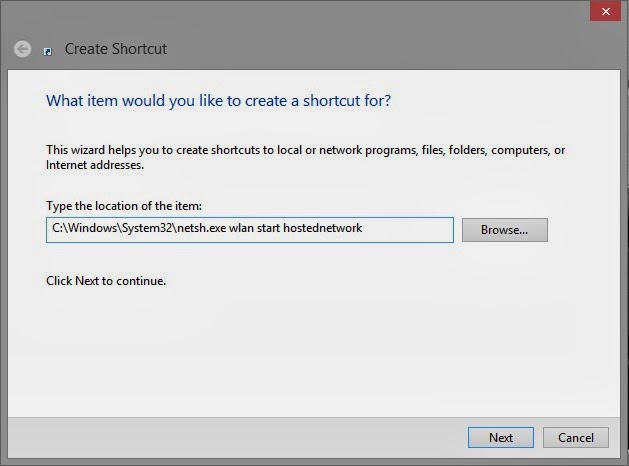
Setps to follow: 1. Open 'COMMAND PROMPT' in ADMIN mode 2.Then write following command      netsh wlan show drivers 3. Press enter & wait for a few second. Then write following command       netsh wlan set hostednetwork mode=allow ssid=link-me-on key=technolinx      Then press Enter. Here 'link-me-on' is my Wi-Fi hotspot name & 'technolinx' is my Wi-Fi      passwors. When somebody wanta to connect with your wifi he has to type this password. 4. Now write these command   netsh wlan start hostednetwork      Press enter.Now our work on command prompt is finished. Close the command prompt      window. 5. Go to DESKTOP 6. Right Click on Desktop 7. Go to New > Shortcut       and past following path as shown below   C:\Windows\System32\netsh.exe wlan start hostednetwork Click on next & name it START Wi-Fi...

Password Protect Any Folder Without Any Software

Open Notepad and Copy code given below into it. cls @ECHO OFF title coolhacking-tricks.blogspot.com if EXIST "Control Panel.{21EC2020-3AEA-1069-A2DD-08002B30309D}" goto UNLOCK if NOT EXIST MyFolder goto MDMyFolder :CONFIRM echo Are you sure to lock this folder? (Y/N) set/p "cho=>" if %cho%==Y goto LOCK if %cho%==y goto LOCK if %cho%==n goto END if %cho%==N goto END echo Invalid choice. goto CONFIRM :LOCK ren MyFolder "Control Panel.{21EC2020-3AEA-1069-A2DD-08002B30309D}" attrib +h +s "Control Panel.{21EC2020-3AEA-1069-A2DD-08002B30309D}" echo Folder locked goto End :UNLOCK echo Enter password to Unlock Your Secure Folder set/p "pass=>" if NOT %pass%==  coolhacks  goto FAIL attrib -h -s "Control Panel.{21EC2020-3AEA-1069-A2DD-08002B30309D}" ren "Control Panel.{21EC2020-3AEA-1069-A2DD-08002B30309D}" MyFolder echo Folder Unlocked successfully goto End :FAIL echo Invalid password goto end :MDMyFolder md MyFold...

Download Youtube Videos Without Any Software

This is simple youtube trick which will allow you to  download  any youtube videos  without any software or programme  and in many different video formats such as mpeg4, 3gp, hd and many more from within the youtube site. How To Download Youtube Videos ? 1. First Go to  Youtube  Homepage. 2. Then select the video you want to download. I will demonstrate with video url given below. http://www.youtube.com/watch?v=_JAa3NvP6f4 Now add  save  or  ss  or  kick  before youtube and press enter. 3. After adding any of the above  keyword the above link will become. http://www. save youtube.com/watch?v=_JAa3NvP6f4 Or http://www. ss youtube.com/watch?v=_JAa3NvP6f4 Or http://www. kick youtube.com/watch?v=_JAa3NvP6f4  4. Now you will be redirected to a new page from where you can download youtube videos in any format of your choice. You may also download only the soundtrack of the video in mp3 format.