Posts

Showing posts with the label SCCM WDI

Error when inserting a driver into boot images (WIM file)

Issue : Sometimes you happen to import network drivers in boot image file and you receive this below error , even if you try to update DPs manually. Error:  Failed to import the following drivers: Intel® 82567LM-3 Gigabit Network Connection - Failed to inject a ConfigMgr driver into the mounted WIM file Error: The wizard detected the following problems when updating the boot image. Failed to inject a ConfigMgr driver into the mounted WIM file Failed to inject a ConfigMgr driver into the mounted WIM file Failed to inject a ConfigMgr driver into the mounted WIM file Failed to inject a ConfigMgr driver into the mounted WIM file The ConfigMgr Provider reported an error.: ConfigMgr Error Object: instance of SMS_ExtendedStatus { Description = "Failed to insert OSD binaries into the WIM file"; ErrorCode = 2152205056; File = "c:\\qfe\\nts_sms_fre\\sms\\siteserver\\sdk_provider\\smsprov\\sspbootimagepackage.cpp"; Line = 4262; ObjectInfo = "CSspBootImagePackage::PreR...
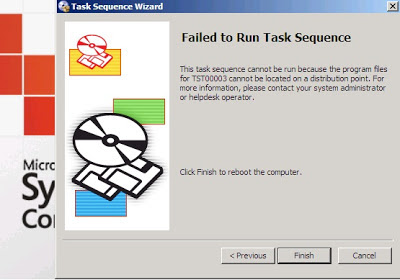
This Task Sequence cannot be run because the program files for cannot be located on a distribution point

Image
Running Task sequence using SCCM 2007 R3 you are receiving this error message: This Task Sequence cannot be run because the program files for cannot be located on a distribution point   Analyzing in WINPE local workstation log file x:\windows\temp\smstslog\smsts.log shows following: It is clear that the problem is with TST00003. To find which Package is associated with this number, go to Package Status. On the right pane all packages are shown  with their Package ID. In our case is KB977384 - Advanced Client hotfix where Distribution point is not installed. To resolve this issue just add New Distribution point to this Package or delete the distribution point and recreate a new one will resolve the issue. Reference : http://tompopov.blogspot.in/2012/12/this-task-sequence-cannot-be-run.html

USMT Offline Migration in Windows PE with Hardlinks

Image
Let’s get on with it. What are we talking about here? User backup of all important files, bookmarks, user profiles and their desktops using Microsoft User State Migration Toolkit v4. We want to do this not from within Windows but during the Windows PE state before we apply a new OS. The good thing about doing this in Windows PE and with Hardlinks is pronounced Speed. Hardlinks make file copying locally and over the network unnecessary. It needs no extra disk space and there won’t be any locked files as when you’re doing migrations from within Windows. It’s not magic but it’s pretty close. Also if you have a computer that doesn’t boot into Windows but has lots of important files on it and with a readable disk – this is the only way to copy that data. The only thing you can’t do with USMT and Hardlinks in Windows PE is if you’re replacing the hardware. USMT with hardlinks in Windows PE mode is for re-installing the computer with a new OS (or OS version) only. For othe...